Posts

Dual Axis Mini CCTV Camera using ESP32 Cam | IOT Based Science Project / Harish Projects

Image
  Purchase Course Video👇 https://harishprojects.graphy.com/ Watch full Detailed Video👇 Project Code👇 #include "esp_camera.h" #include <Arduino.h> #include <WiFi.h> #include <AsyncTCP.h> #include <ESPAsyncWebServer.h> #include <iostream> #include <sstream> #include <ESP32Servo.h> #define PAN_PIN 14 #define TILT_PIN 15 Servo panServo; Servo tiltServo; struct MOTOR_PINS {   int pinEn;     int pinIN1;   int pinIN2;     } ; std::vector<MOTOR_PINS> motorPins = {   { 2 , 12 , 13 } , //RIGHT_MOTOR Pins (EnA, IN1, IN2)   { 2 , 1 , 3 } ,  //LEFT_MOTOR  Pins (EnB, IN3, IN4) } ; #define LIGHT_PIN 4 #define UP 1 #define DOWN 2 #define LEFT 3 #define RIGHT 4 #define STOP 0 #define RIGHT_MOTOR 0 #define LEFT_MOTOR 1 #define FORWARD 1 #define BACKWARD - 1 const int PWMFreq = 1000 ; /* 1 KHz */ const int PWMResolution = 8 ; const int PWMSpeedChannel = 2 ;...

How to make RFID Door lock using Arduino / Best science Project.

Image
Watch video on YouTube Click here -  https://www.youtube.com/watch?v=YdRe2OoD0xo Project Diagram ARDUINO CODE // WELCOME TO THE HARISH PROJECTS YOUTUBE CHANNEL // PLEASE SUBSCRIBE TO MY CHANNEL // PRESS THE BELL ICON TO GET NOTIFIED MY LATEST VIDEO UPDATE // THEANKS FOR WATCHING #include <SPI.h> #include <MFRC522.h> #include <Servo.h>   #define SS_PIN 10 #define RST_PIN 9 #define LED_G 5 //define green LED pin #define LED_R 4 //define red LED #define BUZZER 2 //buzzer pin MFRC522 mfrc522(SS_PIN, RST_PIN);   // Create MFRC522 instance. Servo myServo; //define servo name   void setup()  {   Serial.begin(9600);   // Initiate a serial communication   SPI.begin();      // Initiate  SPI bus   mfrc522.PCD_Init();   // Initiate MFRC522   myServo.attach(3); //servo pin   myServo.write(0); //servo start position   pinMode(LED_G, OUTPUT);   pinMode(LED_R, OUTPUT);   pinMo...

Smart zebra Crossing Best science Project / servo motor arduino project.

Image
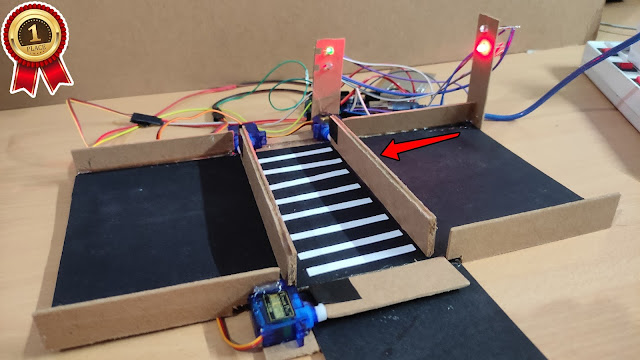
...............Diagram.............                                         ....................... Arduino Code............................. #include <Servo.h> //import library       Servo myservo;  int led = 13;   Servo myservo1;    int led1 = 12;                               void setup()  {       pinMode(led, OUTPUT);     myservo.attach(9, 500, 2500);      pinMode(led1, OUTPUT);   myservo1.attach(10, 500, 2500); }        void loop()  {        // Rotate Servo 3 by 180 degree   myservo.write(90);   myservo1.write(0);   delay(10);   digitalWrite(led, HIGH);      delay(8000);             ...

Smart Gate / Automatic Gate Best Arduino Project

Image
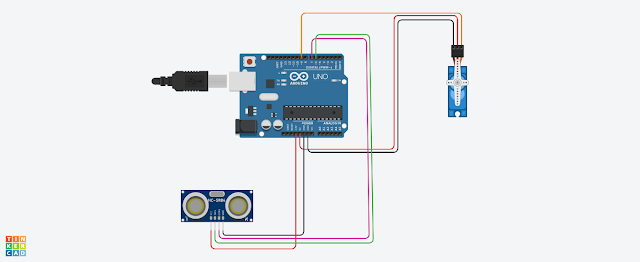
                                                                               Diagram                                                     .......................Arduino code............................. /*  * Created by ArduinoGetStarted.com  *  * This example code is in the public domain  *  * Tutorial page: https://arduinogetstarted.com/tutorials/arduino-ultrasonic-sensor-servo-motor  */ #include <Servo.h> // constants won't change const int TRIG_PIN  = 6;  // Arduino pin connected to Ultrasonic Sensor's TRIG pin const int ECHO_PIN  = 7;  // Arduino pin connected to Ultrasonic Sensor's ECHO pin const int ...

How to make Audio spectrum light Amazing 🔥 Project

Image
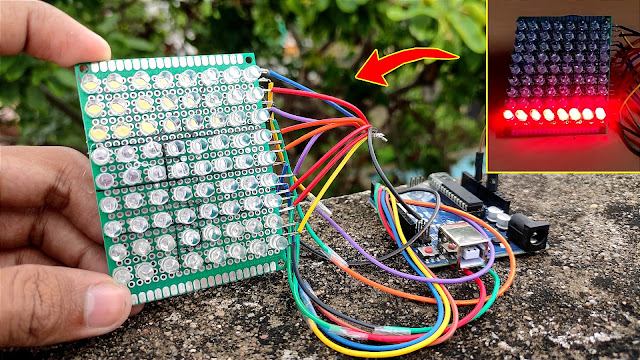
                              Project Diagram ...............................Arduino Code................................. int soundPin = A0; int LED1 = 2; int LED2 = 3; int LED3 = 4; int LED4 = 5; int LED5 = 6; int LED6 = 7; int LED7 = 8; int LED8 = 9; void setup() { Serial.begin(9600); pinMode(LED1, OUTPUT); pinMode(LED2, OUTPUT); pinMode(LED3, OUTPUT); pinMode(LED4, OUTPUT); pinMode(LED5, OUTPUT); pinMode(LED6, OUTPUT); pinMode(LED7, OUTPUT); pinMode(LED8, OUTPUT); } void loop() { long sum = 0; for(int i=0; i<100; i++) // taking 100 sample of sound { sum += analogRead(soundPin); } sum = sum/100; // average the sample of sound if (sum>=100) digitalWrite(LED1, HIGH); else digitalWrite(LED1, LOW); if (sum>=200) digitalWrite(LED2, HIGH); else digitalWrite(LED2, LOW); if (sum>=300) digitalWrite(LED3, HIGH); else digitalWrite(LED3, LOW); if (sum>=350) digitalWrite(LED4, HIGH); else digitalWrite(LE...

Fire Alarm science Project "Harish Projects"

Image
                                                                      Diagram Subscribe My channel on YouTube "Harish Projects"

Gas Leak & Smoke Alarm - Amazing Best science Project #scienceProject

Image
                                                        ...............ARDUINO CODE..................   #include <LiquidCrystal.h> LiquidCrystal lcd(7, 6, 5, 4, 3, 2);   int redLed = 10; int greenLed = 12; int buzzer = 8; int smokeA0 = A0; // Your threshold value int sensorThres = 250;   void setup() {   pinMode(redLed, OUTPUT);   pinMode(buzzer, OUTPUT);   pinMode(smokeA0, INPUT);   Serial.begin(9600);   lcd.begin(16,2); }   void loop() {   int analogSensor = analogRead(smokeA0);     Serial.print("Pin A0: ");   Serial.println(analogSensor);   lcd.print("Harish :");   lcd.print(analogSensor-250);   // Checks if it has reached the threshold value   if (analogSensor-250 > sensorThres)   {     digitalWrite(redLed, HIGH);     lcd.setCur...

Automatic watering for Plants Best Arduino Project

Image
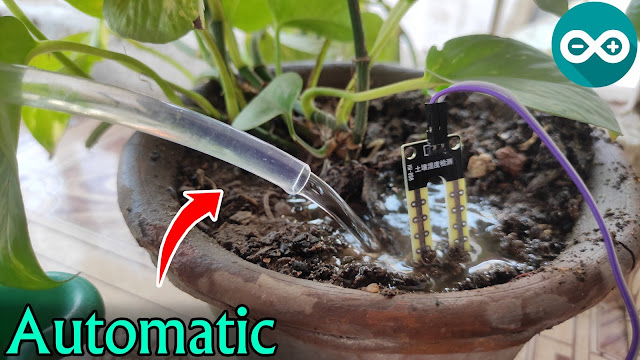
                                                             ...........ARDUINO CODE.......... int WATERPUMP = 13; //motor pump connected to pin 13 int sensor = 8; //sensor digital pin vonnected to pin 8 int val; //This variable stores the value received from Soil moisture sensor. void setup() {      pinMode(13,OUTPUT); //Set pin 13 as OUTPUT pin   pinMode(8,INPUT); //Set pin 8 as input pin, to receive data from Soil moisture sensor.   //Initialize serial and wait for port to open:   Serial.begin(9600); // opens serial port, sets data rate to 9600 bps   while (! Serial);// wait for serial port to connect. Needed for native USB   Serial.println("Speed 0 to 255"); } void loop()   {    if (Serial.available()) //loop to operate motor   {     int speed = Serial.parseInt(...