Posts

Dual Axis Mini CCTV Camera using ESP32 Cam | IOT Based Science Project / Harish Projects

Image
  Purchase Course Video👇 https://harishprojects.graphy.com/ Watch full Detailed Video👇 Project Code👇 #include "esp_camera.h" #include <Arduino.h> #include <WiFi.h> #include <AsyncTCP.h> #include <ESPAsyncWebServer.h> #include <iostream> #include <sstream> #include <ESP32Servo.h> #define PAN_PIN 14 #define TILT_PIN 15 Servo panServo; Servo tiltServo; struct MOTOR_PINS {   int pinEn;     int pinIN1;   int pinIN2;     } ; std::vector<MOTOR_PINS> motorPins = {   { 2 , 12 , 13 } , //RIGHT_MOTOR Pins (EnA, IN1, IN2)   { 2 , 1 , 3 } ,  //LEFT_MOTOR  Pins (EnB, IN3, IN4) } ; #define LIGHT_PIN 4 #define UP 1 #define DOWN 2 #define LEFT 3 #define RIGHT 4 #define STOP 0 #define RIGHT_MOTOR 0 #define LEFT_MOTOR 1 #define FORWARD 1 #define BACKWARD - 1 const int PWMFreq = 1000 ; /* 1 KHz */ const int PWMResolution = 8 ; const int PWMSpeedChannel = 2 ;...
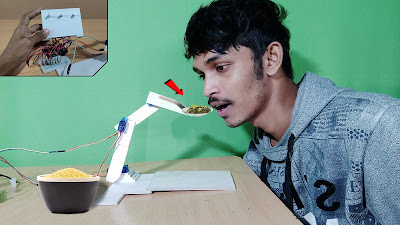
Automatic food feeder Robot for Handicapped Person's Best Project / Harish Projects

Image
                                                          Click Here to watch full video                                              https://www.youtube.com/watch?v=QaJKs9xJkSk                         ...............................................Arduino Code................................................ //Code written by Ryan Chan; it is pretty inefficient, but gets the job done, I challenge you to make it more efficient! //*IMPORTANT CHANGES IN VERSION 2: LEDs 4 and 5 have been moved to pins 7 and 8 respectively; Buttons 1 and 2 have been moved to pins 12 and 13 respectively. This is to make wiring easier. #include <Servo.h> Servo servo1; //Servos Servo servo2;...

Voice Control Humanoid Robot - Best Project For Collage students / amazing science project

Image
                          Click Here Full Making Video Link -   https://youtu.be/wHjmwelL95c ......................Diagram........................ .............................Arduino Code.......................... #include <SoftwareSerial.h> SoftwareSerial BT(0, 1); //TX, RX respetively String readvoice; void setup() {  BT.begin(9600);  Serial.begin(9600);   pinMode(4, OUTPUT);   pinMode(3, OUTPUT);   pinMode(5, OUTPUT);   pinMode(6, OUTPUT); } //-----------------------------------------------------------------------//  void loop() {   while (BT.available()){  //Check if there is an available byte to read   delay(10); //Delay added to make thing stable   char c = BT.read(); //Conduct a serial read   readvoice += c; //build the string- "forward", "reverse", "left" and "right"   }    if (readvoice.length() > 0) {     Seri...

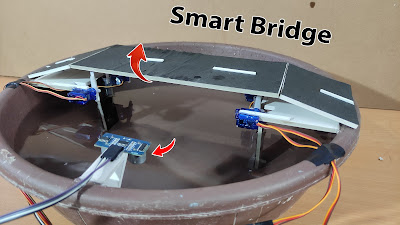
Smart Bridge - According to water level Best science Project.

Image
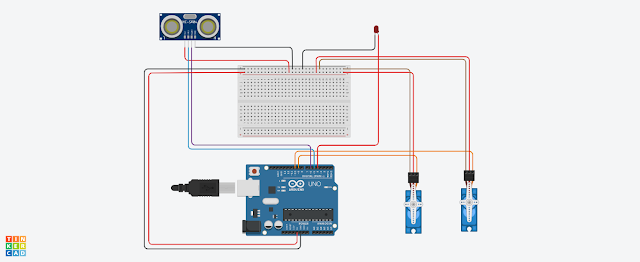
  .......................Diagram...................... ...................Arduino Code..................... //YouTube Harish Projects  #include <Servo.h> // constants won't change const int TRIG_PIN  = 6;  // Arduino pin connected to Ultrasonic Sensor's TRIG pin const int ECHO_PIN  = 7;  // Arduino pin connected to Ultrasonic Sensor's ECHO pin const int SERVO_PIN = 9; // Arduino pin connected to Servo Motor's pin const int DISTANCE_THRESHOLD = 4; // centimeters Servo servo; // create servo object to control a servo // variables will change: float duration_us, distance_cm; void setup() {   Serial.begin (9600);       // initialize serial port   pinMode(TRIG_PIN, OUTPUT); // set arduino pin to output mode   pinMode(ECHO_PIN, INPUT);  // set arduino pin to input mode   servo.attach(SERVO_PIN);   // attaches the servo on pin 9 to the servo object   servo.write(0); } void loop() {   // generat...

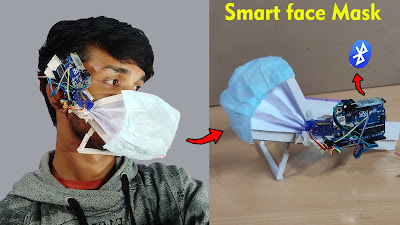
How to make phone controlled Smart face mask best science project. #scienceproject

Image
                     Click Here to watch video -  https://www.youtube.com/watch?v=SE1QYyHkadc                                                                          --Arduino Code-- #include <SoftwareSerial.h> // TX RX software library for bluetooth #include <Servo.h> // servo library  Servo myservo; // servo name int bluetoothTx = 10; // bluetooth tx to 10 pin int bluetoothRx = 11; // bluetooth rx to 11 pin SoftwareSerial bluetooth(bluetoothTx, bluetoothRx); void setup() {   myservo.attach(9); // attach servo signal wire to pin 9   //Setup usb serial connection to computer   Serial.begin(9600);   //Setup Bluetooth serial connection to android   bluetooth.begin(9600); } void loop() {   //Read from ...

How to Make RFID car Best science Project / Arduino Project.

Image
                                                  Click Here to watch video on YouTube ...........................................................................Diagram...................................................................  ................................................................. Arduino Car Code...........................................................  char t;   void setup() { pinMode(13,OUTPUT);   //left motors forward pinMode(12,OUTPUT);   //left motors reverse pinMode(11,OUTPUT);   //right motors forward pinMode(10,OUTPUT);   //right motors reverse pinMode(9,OUTPUT);   //Led Serial.begin(9600);   }   void loop() { if(Serial.available()){   t = Serial.read();   Serial.println(t); }   if(t == 'F'){            //move for...

Social Distancing cap Arduino science Project

Image
 Diagram Arduino Code  #define buzzer 6 void setup() { pinMode(12,OUTPUT);//Trigger pinMode(13,INPUT);//EchoA pinMode(6,OUTPUT);//Buzzer } void loop() { long duration, distance; digitalWrite(12,LOW); delayMicroseconds(2); digitalWrite(12,HIGH); delayMicroseconds(10); digitalWrite(12,LOW); duration=pulseIn(13,HIGH); distance=(duration/2)/29.1; if (distance < 70)     // This is where checking the distance you can change the value {  // When the the distance below 100cm digitalWrite(6,HIGH); } else { // when greater than 100cm digitalWrite(6,LOW); } delay(500); }

How to make smart Dustbin & get free Chocolate Best Arduino Project

Image
 Watch video on YouTube Click here -  https://youtu.be/TET7ZB5weYo Diagram  Arduino Code /*   code started   diy smart chocolate dustbin   #define led = D4;   #define trigger pin = D5;   #define echo pin = D6;   #define servo pin = D9;   #define servo pin2 =D10;   code created by technical ideas yt   https://youtube.com/c/TechnicalidEas07    */ #include <Servo.h>   Servo servo1;   Servo servo2;   int led=4;   int trig=5;   int echo=6;   int servo1_pin=9;   int servo2_pin=10;   int duration=0,dist=0;   void setup()   {     Serial.begin(9600);        pinMode(led,OUTPUT);   pinMode(trig,OUTPUT);   pinMode(echo,INPUT);     servo1.attach(servo1_pin);     servo2.attach(servo2_pin);     servo1.write(90);     servo2.write(90);   }     void loop()   {     digitalW...