Posts

Dual Axis Mini CCTV Camera using ESP32 Cam | IOT Based Science Project / Harish Projects

Image
  Purchase Course Video👇 https://harishprojects.graphy.com/ Watch full Detailed Video👇 Project Code👇 #include "esp_camera.h" #include <Arduino.h> #include <WiFi.h> #include <AsyncTCP.h> #include <ESPAsyncWebServer.h> #include <iostream> #include <sstream> #include <ESP32Servo.h> #define PAN_PIN 14 #define TILT_PIN 15 Servo panServo; Servo tiltServo; struct MOTOR_PINS {   int pinEn;     int pinIN1;   int pinIN2;     } ; std::vector<MOTOR_PINS> motorPins = {   { 2 , 12 , 13 } , //RIGHT_MOTOR Pins (EnA, IN1, IN2)   { 2 , 1 , 3 } ,  //LEFT_MOTOR  Pins (EnB, IN3, IN4) } ; #define LIGHT_PIN 4 #define UP 1 #define DOWN 2 #define LEFT 3 #define RIGHT 4 #define STOP 0 #define RIGHT_MOTOR 0 #define LEFT_MOTOR 1 #define FORWARD 1 #define BACKWARD - 1 const int PWMFreq = 1000 ; /* 1 KHz */ const int PWMResolution = 8 ; const int PWMSpeedChannel = 2 ;...

Automatic Smart Street Light | Best science Project | Harish Projects

Image
 Watch Full Detailed Video //Arduino Code int IR1 = 8; int IR2 = 12; int IR3 = 13; int LDR = 7; int led1 = 3; int led2 = 5; int led3 = 6; int val1; int val2; int val3; int val4; void setup() { pinMode(IR1,INPUT); pinMode(IR2,INPUT); pinMode(IR3,INPUT); pinMode(LDR,INPUT); pinMode(led1,OUTPUT); pinMode(led2,OUTPUT); pinMode(led3,OUTPUT); } void loop() { val1 = digitalRead(IR1); val2 = digitalRead(IR2); val3 = digitalRead(IR3); val4 = digitalRead(LDR); if(val1==1&&val4==0&&val2==1&&val3==1) { digitalWrite(3,LOW); digitalWrite(5,LOW); digitalWrite(6,LOW); } else if(val1==1&&val4==1&&val2==1&&val3==1) { analogWrite(3,20); analogWrite(5,20); analogWrite(6,20); } else if(val1==0&&val4==1&&val2==1&&val3==1) { analogWrite(3,500); analogWrite(5,20); analogWrite(6,20); } else if(val1==1&&val4==1&&val2==0&&val3==1) { analogWrite(3,20); analogWrite(5,500); analogWrite(6,20); } else if(val1==1&...

Amazing Best science Project / Water flow & value Monitoring / Water Flow Sensor / Best science Project / School & college level

Image
.....Project Diagram..... //....Arduino Code.... /* YF‐ S201 Water Flow Sensor Water Flow Sensor output processed to read in litres/hour Adaptation Courtesy: */ volatile int flow_frequency; // Measures flow sensor pulses // Calculated litres/hour   float vol = 0.0 ,l_minute; unsigned char flowsensor = 2 ; // Sensor Input unsigned long currentTime; unsigned long cloopTime; #include <LiquidCrystal.h> LiquidCrystal lcd ( 12 , 11 , 5 , 4 , 3 , 9 ) ; void flow () // Interrupt function {    flow_frequency++; } void setup () {     pinMode ( flowsensor, INPUT ) ;     digitalWrite ( flowsensor, HIGH ) ; // Optional Internal Pull-Up     Serial . begin ( 9600 ) ;     lcd . begin ( 16 , 2 ) ;     attachInterrupt ( digitalPinToInterrupt ( flowsensor ) , flow, RISING ) ; // Setup Interrupt     lcd . clear () ;     lcd . setCursor ( 0 , 0 ) ;     lcd . print ( "Petrol Flow Meter" ) ; ...

Smart Shoes for Blind Persons / Intelligent walking Shoes / Best Science Project / Harish Projects

Image
 Watch Full Making video on Youtube. //........Arduino Code......... #define buzzer 6 void setup () { pinMode ( 12 ,OUTPUT); //Trigger pinMode ( 13 ,INPUT); //EchoA pinMode ( 6 ,OUTPUT); //Buzzer } void loop () { long duration, distance; digitalWrite ( 12 ,LOW); delayMicroseconds ( 2 ); digitalWrite ( 12 ,HIGH); delayMicroseconds ( 10 ); digitalWrite ( 12 ,LOW); duration= pulseIn ( 13 ,HIGH); distance=(duration/ 2 )/ 29.1 ; if (distance < 70 )     // This is where checking the distance you can change the value {  // When the the distance below 100cm digitalWrite ( 6 ,HIGH); } else { // when greater than 100cm digitalWrite ( 6 ,LOW); } delay ( 500 ); }

Train Accident Prevention | 2 Train in same Track | Best Project | Harish Projects

Image
... Project Diagram... Watch Full Detailed Video Part - 1 for Engine Part - 2 for Platform Buy Full Project kit  Click Here -  https://harishprojects.com/product/train-accident-prevention-2-train-in-same-track-best-science-project-kit/

Automatic Railway Gate | Arduino & IR sensor Best science Project 2023 | Harish Projects

Image
....Watch Full Detailed video....  //Arduino code// /*     1.  If an object is detected, turn the        servo motor 10 degrees     2.  If there is no object detected,        turn the servo motor 150 degrees   */   #include <Servo.h>   Servo Serv;   int pinIR=3;   int pinServo=5;   int val=0;   void setup(){     Serv.attach(pinServo);   }   void loop(){     val = digitalRead(pinIR);        if (val ==0){       Serv.write(95);       delay(100);     }     else     {       Serv.write(10);       delay(100);     }   } //You can order Project kit from us. Contact:-  WP - 8602221288 Instagram -  https://www.instagram.com/harishchoudhary70/reels/?hl=en

Make Smart notice Board using Arduino & Bluetooth | Best science Project | Harish Projects

Image
  First watch this full video. only then. Start making this project.  //Arduino Code// #include <LiquidCrystal.h> char str [ 34 ], L = 2 ; int draft = 0 , i = 0 ; int Pass = 0 , p = 0 ; int c , x , d ; LiquidCrystal lcd ( 11 , 10 , 5 , 4 , 3 , 2 ); void setup () { Serial . begin ( 9600 ); pinMode ( 7 , OUTPUT ); lcd . begin ( 16 , 2 ); } void loop () { if ( draft == 1 ) { check (); draft = 0 ; i = 0 ; delay ( 1000 ); } } void serialEvent () { while ( Serial . available ()) { char inChar = Serial . read (); str [ i ++ ] = inChar ; delay ( 10 ); } for ( p = i + 1 ; p < 34 ; p ++ ) { str [ i ++ ] = 32 ; } draft = 1 ; Serial . write ( str ); lcd . setCursor ( 0 , 0 ); lcd . print ( str ); if ( i > 16 ) { d = 16 ; for ( x = 0 ; x <= 17 ; x ++ ) { lcd . setCursor ( x , 2 );...

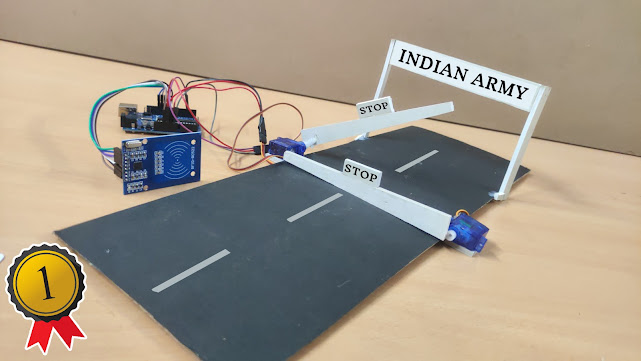
Indian Army security Gate | inspire Award Project | best science Project | Harish Projects 2023

Image
 Click Here to watch full video //Arduino Code// #include <Servo.h> #include <SPI.h> #include <RFID.h> RFID rfid(10, 9); byte kart[5] = {128,207,122,175,154}; Servo myservo; boolean card; void setup() {   Serial.begin(9600);   SPI.begin();   rfid.init();   myservo.attach(3);   myservo.write(100); } void loop() {   if (rfid.isCard())   {     if (rfid.readCardSerial())     {       Serial.print("Found ID: ");       Serial.print(rfid.serNum[0]);       Serial.print(",");       Serial.print(rfid.serNum[1]);       Serial.print(",");       Serial.print(rfid.serNum[2]);       Serial.print(",");       Serial.print(rfid.serNum[3]);       Serial.print(",");       Serial.println(rfid.serNum[4]);     }     for (int i = 1; i < 5; i++)     { ...